• Apple
    • MacBook
    • MacBook Air
    • MacBook Pro
  • Acer
    • Aspire
    • TravelMate
    • Predator
  • Asus
  • Dell
    • Alienware
    • Inspiron
    • Latitude
    • XPS
  • HP
    • EliteBook
    • Envy
    • Omen
    • Pavilion
    • ProBook
    • Stream
    • ZBook
  • Lenovo
    • IdeaPad
    • ThinkPad
    • Yoga
  • Microsoft
    • Surface Book
    • Surface
  • Samsung
  • Toshiba
  • Tech Topics
    • Laptop Graphics
    • Hard Drives
    • Laptop Processor
    • Operating Systems

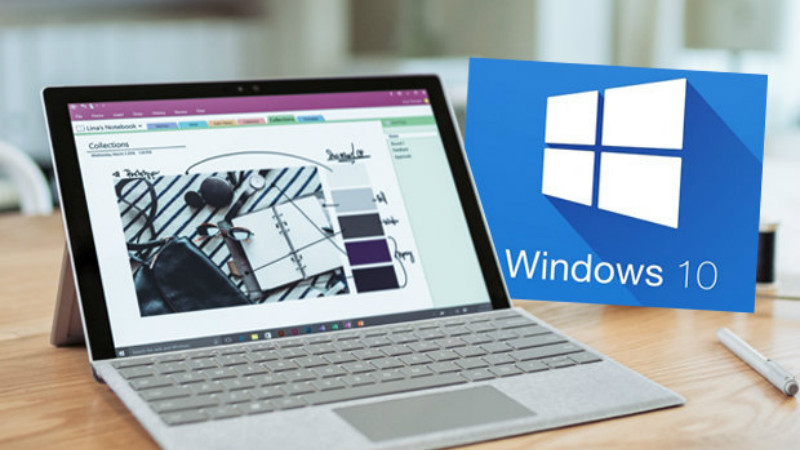
Windows 10 secret feature – Microsoft planning major changes for your laptop

October 17, 2016 by Ian Orford Leave a Comment

trendlogs.comWith it’s latest release it looks like Microsoft has added a whole load of features to Windows 10, including some very handy new ‘gestures’ to help us to speed with the process of navigating around our system using just the trackpad.

Look for all these new goodies in the Advanced Gestures Configuration Page. It’s also nice to know that Microsoft is on the ball with Security Updates. They have just found and fixed four zero-day flaws.

 Windows 10 secret feature – Microsoft planning major changes for your laptop : Microsoft might be busy planning for a major hardware launch next week but that’s not stopping them from tweaking their popular software.read more at trendlogs.com

Filed Under: Operating Systems Tagged With: windows 10 secret feature, windows 10 security updates

This is the Samsung Chromebook Pro, and it comes with a PEN

October 17, 2016 by Ian Orford Leave a Comment

sammobile.comIf you been looking for a classy high-end Chromebook then it looks like Samsung is about to announce just what you are looking for by way of the Chromebook Pro. (A dig at the iPad Pro?)

A very nice looking piece of kit that looks as if its made of aluminum, comes with a Stylus PEN, runs on a hexa-core processor that drives a 12″ touch screen with a fold flat screen, 32GB of storage and 4GB of RAM.

Priced at around $499, Samsung will be announcing the Chromebook Pro as we write this piece

Samsung has quietly listed a new Chromebook on its Korean website. Dubbed Chromebook Pro, it runs Chrome OS and features a 12.3-inch touchscreen display (3:2 aspect ratio) with 400 nits brightness and a resolution of 2400 x 1600 pixels. It uses a 360-degree hinge and comes with a stylus. Samsung is not calling the stylus an S Pen, though. It’s now just called a PEN.Via sammobile.com


Filed Under: Samsung Tagged With: Chromebook Pro, Samsung Chromebook Pro Review

Acer’s swanky Swift 7 launches as the thinnest laptop ever

October 17, 2016 by Ian Orford Leave a Comment

pcworld.comWith every OEM trying to win the ‘thinnest lightest’ laptop war it looks like Acer has won the battle at least temporarily with it’s brand new Swift 7. With the Dell XPS, HP’s Spectre and the MacBook Air and others constantly vying for the crown of the ultimate ultrabook, we wonder how long Acer will hold on to the title.

However, right now if you’re looking for thinnest laptop there is, the very pretty but nonetheless feature packed ultraportable notebook, then the Acer Swift is the one to go for

The battle for barely there computing supremacy continues unabated. Over the past couple of years, we’ve seen PC makers brag about releasing the lightest 13-inch laptop ever, the most svelte MacBook ever, and the thinnest notebook of all time (though that last one apparently overlooked 2009’s Dell Adamo). Today, Acer launched the Swift 7, the newest usurper of the “thinnest laptop ever” crown.

The Swift 7 measures in at a scant 9.9mm thick, compared to 10.4mm for the HP Spectre 13.3, and 10.16mm for the aforementioned Dell Adamo. You could slice cheese with these things. The MacBook 12, meanwhile, clocks in at a comparatively chunky (ha!) 13.2mm thick.

Via pcworld.com


Filed Under: Acer Tagged With: 13.3 inch laptop, Acer, acer swift 7 review, Laptops, Mobile, Swift 7, thinnest laptop

Lenovo Yoga 710 14 Review

October 12, 2016 by Ian Orford Leave a Comment

lenovo yoga 710 14 reviewLenovo started a trend and singlehandedly created a new breed of notebooks when it launched the Yoga concept and that now well-established tradition continues with the upmarket and beautifully designed Lenovo Yoga 710 14″.
With it’s upmarket magnesium-aluminum construction, classic lines, solid performance and market leading price, the Yoga 710 looks like being another class leader for Lenovo. What we particularly like about this iteration of Lenovo’s Yoga brand is the fact that it manages to stand comparison with the likes of the Yoga 900 and the HP Spectre x360, yet remain well below their cost, without losing much of the same luxury look and feel.

Take a look at Charles P Jefferies full review of the Lenovo Yoga 710 14″ over at Notebookreview…
<blockquote class=”curated_content”>The new Yoga 710 series is the replacement for the older Yoga 700, which debuted at the end of 2015. The “Yoga” in the name isn’t merely for show, as these notebooks are capable of folding their displays 360 degrees around to transform into a tablet, or two in-between modes. The model we’re reviewing features a 14-inch display, but the 710 series is also available in 11- and 15.6-inch models.

The key selling points of the Lenovo Yoga 710 14 are its premium magnesium-aluminum chassis, stylish design, good quality display, and excellent battery life. It’s too thick and heavy to be considered as a dedicated tablet replacement, but that complaint isn’t unique to this convertible PC. As a matter of fact, we’ve said that about almost every convertible PC we’ve reviewed. The convertible modes should be viewed as a bonus.</blockquote>

Filed Under: Yoga Tagged With: lenovo yoga 710 14 2017, lenovo yoga 710 14 review

Lenovo IdeaPad 710S Review: A High-Value Ultrabook

October 11, 2016 by Ian Orford Leave a Comment

Lenovo’s IdeaPad 710s brings a lightweight premium look and feel to their already extensive range of great looking Ultrabooks.

Lenovo really did a great job of branding their consumer laptops by borrowing the cache from the ThinkPad brand when they bought the business from IBM back in 2005. The first IdeaPads launched in 2008 with some innovative features that can be said to have led the way in lightweight ultrabook design.

The new IdeaPad 710s continues the value look and feel with a laptop that feels so light you have to remind yourself it is actually made of metal, albeit lightweight magnesium and aluminium. Lenovo has a habit of bringing incremental improvements to its notebooks and the 710s is no exception. With its sleek lines and an almost opulent appearance, it’s no slouch in the performance stakes either.

With its Skylake processors, 16GB of RAM available and fast SSD storage, the IdeaPad 710s is a cracking performer and looks like it could be a winner for Lenovo.

The ideapad 710S is a new premium Ultrabook from Lenovo. It features a classy magnesium-aluminum construction, a near bezel-less display, and is just 2.6 pounds and 0.55 inches thin. On the inside, it packs Intel’s latest “Skylake” Core i-series processors, up to 16GB of RAM, and PCI-express SSD storage. We gave this sleek beauty high marks for just about everything, minus some keyboard layout quibbles, and its subpar selection of ports.

We initially thought the ideapad 710S was plastic when we took it out of the box. It’s lighter than the average 13.3-inch notebook, at 2.6 pounds. This puts it just slightly under the Dell XPS 13 (2016), and the Acer Aspire S 13, two of its closest competitors. Rather than plastic, however, the all-silver ideapad 710S uses magnesium and aluminum. This helps keep the weight down, and also strengthens the chassis. Indeed, the base of the notebook is rigid, with just a bit of side-to-side play when we torqued it by its corners (which you should avoid doing, by the way). The lid has a bit of flex to it, but actually provides excellent protection to the display panel.

We weren’t able to get ripples to appear in the display by pressing in on the back of the lid. This is even more impressive in view of the lid’s thinness. Another impressive fact about the lid is that it tilts 90 degrees past vertical, allowing it to lay completely flat with the surface. This is unusual, as most notebooks tend to stop around the 45 degree mark, or shortly thereafter. The lid’s hinge is a bit too stiff to allow it to be opened one-handed, though.


Check this Topic at notebookreview.com

Image courtesy of notebookreview.com

Filed Under: IdeaPad Tagged With: lenovo ideapad 710s review, lenovo ideapad 710s ultrabook

Apple Aiming for Late October Launch of Redesigned MacBook Pro

October 3, 2016 by Ian Orford Leave a Comment

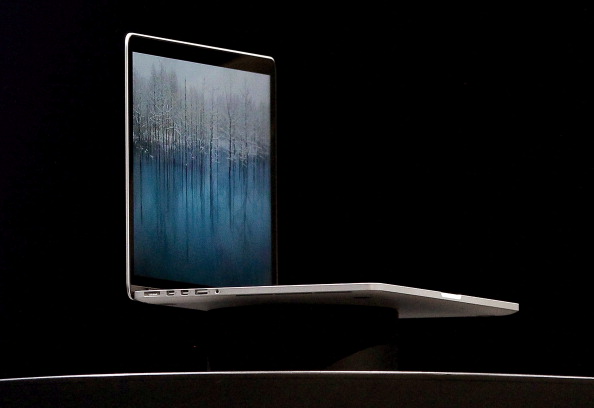
apple macbook pro 15 2016 review

(Photo by Justin Sullivan/Getty Images)

It’s now looking more and more like the new 2016 Apple MacBook Pro is going to be released in late October. On Friday we reported on conjecture from various unsubstantiated sources that a date of the 24th of October had been set. Whilst Apple loves late October release dates, we have as yet no firm announcements from the Apple Campus.

With the iPhone 7 and 7 Plus, plus the Watch 2 released to a great deal of fanfare, it looks like the new and much-needed update to the flagship MacBook is imminent. this could also take the stage with a new MacBook 13: Air, and a new and updated iMac along with a 5k screen. Now that is a release we would love to see. We can also expect Intel Skylake processors and an option for AMD’s 14 nm Polaris GPUs. Tasty…

Apple Likely Aiming for Late October Launch of Redesigned MacBook ProWednesday September 28, 2016 12:45 pm PDT by Eric SlivkaWith the iPhone 7 and Apple Watch Series 2 launches having dominated the Apple news cycle in recent weeks, attention is now turning back to the Mac lineup, which has been in need of updates for quite some time as highlighted by our Buyer’s Guide.

Looking ahead to the rapidly approaching holiday shopping season, rumors have suggested Apple is preparing to update several of its Mac lines before the end of the year, led by a redesigned MacBook Pro that has been rumored to be ready for launch “as soon as October.”

MacRumors has learned that Apple is indeed moving rapidly toward a launch of the new MacBook Pro models, with the company’s current development work on macOS 10.12.1 focused largely on preparing the operating system to support the updated hardware’s new features, which have been rumored by several sources to include Touch ID support and an OLED “touch bar” replacing the current row of function keys across the top of keyboard.

Check this Topic at macrumors.com

Justin Sullivan/Getty Images

Filed Under: MacBook Pro Tagged With: apple macbook 2016 release date, apple macbook pro redesign, apple macbook retina 2016 update

Expectations Grow For 2016 MacBook Pro Launch Looks Like Late October

October 3, 2016 by Ian Orford 1 Comment

Rumours are now coming thick and fast from the tech mill with the latest post from 9to5Mac publishing an admittedly vague whisper off the grapevine that the new Apple MacBook Pro 15″ for 2016 will be announced on October the 24th.

Reliable sources are also predicting that Tim Cook will be on stage announcing a new MacBook Air in 13″ and also a brand new iMac with a wait for it, 5k Screen! We like that one, so let’s hope that Tim and his crew deliver.

Get the full run down at 9to5Mac…

With numerous reports suggesting that Apple will launch a new MacBook Pro range in late October, one sketchy rumorsuggests that the keynote presentation will take place on October 24. A Monday doesn’t seem particularly likely, and the ‘multiple sources’ cited are apparently just anonymous emails, but sometime around that date seems more likely than not. Logic dictates that a new OS update will be required for these new machines and if they were ready late September/early October, Apple would have added them to the September event.

Additionally, Apple is known for its lateOctober launches, having had one in October four of the past five years (skipping last year) and it wants to have its channel full of inventory for the runup to the holidays in November. So October is a safe guess for upcoming products…

Check this Topic at 9to5mac.com

Image courtesy of 9to5mac.com

Filed Under: MacBook Pro Tagged With: apple macbook 2016 release date, apple macbook pro 2016 review, apple macbook pro redesign

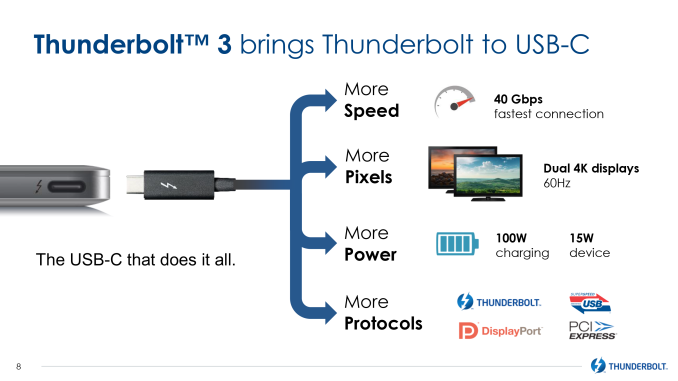
Thunderbolt Meets USB (At Last) | The Future Of Data Bus

September 30, 2016 by Ian Orford Leave a Comment

Merging Thunderbolt 3 and USB Type-C brings a huge amount of flexibility and power to the external data bus. Just why and how this is happening technically will be beyond the limits of comprehension for most of us mere mortals, all we have to know is that we now have 40Gbps available for much faster data transfer, more pixels pushed to our 4k displays, more charging power up to 100w and more protocols to connect virtually any dock, device or display.

It looks like we finally have a data bus standard that will provide the flexibility and bandwidth to drive and connect our devices that will expand virtually ‘on demand’.

A lot has been happening in the world of external communication buses over the past year. In the last 12 months the USB consortium has announced both 10Gbps “Superspeed+” USB 3.1 and the new USB Type-C connector, USB’s new compact, reversible connector that is designed to drive the standard for the next decade or more. Meanwhile with the introduction of USB Alternate Mode functionality – the ability for USB Type-C to carry other protocols along with (or instead of) USB Superspeed data – has made USB more flexible than ever, with the VESA announcing that DisplayPort will be supporting alternate mode to deliver DisplayPort video over USB Type-C ports and cabling.

As a result, the introduction of USB Type-C has led to a definite and relatively rapid transition over to the new standard. With the USB consortium having designed a very capable and desirable physical layer for Type-C, and then alternate modes allowing anyone to use that physical layer, there have been a number of other technologies that have started aligning themselves with USB in order to take advantage of what is becoming an even more common platform for external buses.

Check this Topic at anandtech.com

Image courtesy of anandtech.com

Filed Under: Tech Topics Tagged With: thunderbolt 3, usb type-c

How To Upgrade Your Notebook with an External Graphics Card

September 27, 2016 by Ian Orford Leave a Comment

akito-thunder2-pcie-box-review

How To Upgrade your Laptop with an eGPU.

If you’ve purchased a laptop with thoughts of future proofing, in other words, bought the most powerful processor, the biggest hard drive and the largest chunk of memory you can afford, plus of course the best mobile graphics your budget will stretch to, your pretty well est for a few years.

Right? Wrong!

If you’re a gamer or avid media buff, the very first thing to hit dinosaur status is your graphics card. The super fast GPU that came with your shiny new Laptop could feel antiquated within 18 months.

Plenty of life left in the processor, but your new games are running like a dog.

So what to do? Well, in theory, the GPU on your notebooks motherboard is upgradeable, but in practice, its not a standard any manufacturer has adopted.

So your only alternative is an External GPU or eGPU. Now there are some mainstream OEM’s who have their own eGPU, MSI, Alienware, and the Razer Blade with the superb Razer Core. But these have proprietary interfaces so what if you want to upgrade your nongaming rig to the latest Desktop GPU heaven?

Well, the answer to your prayers may be here with the EXP GDC Laptop External PCI-E Graphics Card, or our choice, the Akitio Thunder2 PCIe Box. Now, warning, neither are just plug and play, but right now until a smart mainstream manufacturer like Nvidia fills the gap with a USB-C eGPU, this is what we are stuck with

Its no secret that upgradeable notebook graphics are a bit of an oxymoron. Despite the fact Nvidias MXM modular graphics card technology has been available to notebook designers for over a decade, few have fully adopted the standard. The lack of a universal solution for upgrading notebook graphics has left notebook owners at a significant economic disadvantage relative to desktop PC owners.

In the gaming world, and other graphics-intensive usages, the graphics card is usually the primary performance-limiting factor. Extending the life cycle of a gaming desktop or a professional 3D rendering workstation can be as simple as swapping in a new graphics card. On the notebook side of the equation, even if its processor, memory, and storage are up to the task (and they usually will be for many years after the fact) the lack of a powerful-enough graphics card means your old laptop is now obsolete. It can make the purchase of a gaming notebook or a mobile workstation a hard sell if youre interested in a longer-term investment.

Although not a new idea, using an external graphics solution has only recently caught on in the mainstream. These solutions allow you to plug in an external enclosure to your notebook, and enjoy the power of a desktop graphics card. The original DIY solutions, as well discuss in the next section, werent all that elegant, but they paved the way for the elegant plug-and-play solutions now being produced by mainstream notebook makers. Lets take a look.

Check this Topic at notebookreview.com

Filed Under: Laptop Graphics Tagged With: how to upgrade your laptop gpu, how to upgrade your laptop graphics card, laptop egpu upgrade

Surface Book 2 release date, news and rumors

September 23, 2016 by Ian Orford Leave a Comment


microsoft surface book 2 review

When Microsoft launched the Surface Book last year it was a much praised instant hit. This was Microsoft’s first attempt at a ‘real’ laptop, albeit a convertible, and there is no doubt they did a great job.

Despite it’s success, the Surface Book has had a few hiccups, so fans are eager for news of a supposed Surface Book 2

Rumors are rife right now that a new iteration will be released early 2017 along with, wait for it, a Surface Phone and an All In One Surface PC.

Lets hope they can deliver. Because we are waiting with bated breath.

Microsoft released its Surface Book 2-in-1 in October 2015, calling it the “ultimate laptop.” It shipped jam-packed with a detachable screen, Surface Pen support, Intel “Skylake” dual-core processors and Windows 10 Professional. That’s on the low-end configuration. Shell out an extra 200 bucks (£300, AU$600) over the $1,499 (£1,299, AU$1,899) asking price and Microsoft will throw in an Nvidia-based discrete GPU.

Despite an appetizing list of hardware specs, the 2-in-1 didn’t arrive without a few hiccups. There were some complaints surrounding the “Dynamic Fulcrum Hinge” including a gap that’s formed when the laptop is closed. The Clipboard tablet portion of the device has a low battery life, and the pricing is rather steep on the higher end.

So, you can tell that we’re not the only ones already clamoring for Microsoft to improve on an already promising formula. Enter the (would-be) Surface Book 2, a device so highly anticipated that some people are already fabricating leaks just to egg Microsoft on.

Check this Topic at techradar.com

Image courtesy of techradar.com

Filed Under: Surface Book Tagged With: microsoft surface book 2 review, microsoft surface book 2 rumors, microsoft surface book 2017, microsoft surface book release date

  • « Previous Page
  • 1
  • 2
  • 3
  • 4
  • 5
  • 6
  • Next Page »

Search Topics

Connect With Us Online

  • Facebook
  • Instagram
  • Pinterest
  • YouTube

Features

  • Switch From MacBook To Windows – And Why You Should – Roundup March 18, 2017
  • Try And Break This! Dell Latitude Rugged Laptop March 15, 2017
  • Laptop Tech Support: 2017 Reviews – Apple Hits The Spot Again March 13, 2017
  • Apple Is Dead To Me… And why NOT to buy a MacBook March 13, 2017
  • Dell Inspiron 15 7000 Gaming (7567) Review – Best Budget Gamer? March 10, 2017

Topic Categories

  • Acer
  • Alienware
  • Apple
  • Asus
  • Dell
  • EliteBook
  • Envy
  • Hard Drives
  • HP
  • IdeaPad
  • Inspiron
  • iPhone 7
  • Laptop Graphics
  • Laptop Processor
  • Latitude
  • Lenovo
  • MacBook
  • MacBook Pro
  • MSI
  • Omen
  • Operating Systems
  • Pavilion
  • Samsung
  • Surface
  • Surface Book
  • Tech Topics
  • ThinkPad
  • Toshiba
  • XPS
  • Yoga

Tech Topics

It's showdown time again with their yearly tech support showdown Laptop Mag … [Read Topic...]

Laptop Topics

  • About
  • Contact Us

Our Partners

laptop topics laptop topics laptop topics

Copyright © 2026 · News Pro Theme on Genesis Framework · WordPress · Log in