• Apple
    • MacBook
    • MacBook Air
    • MacBook Pro
  • Acer
    • Aspire
    • TravelMate
    • Predator
  • Asus
  • Dell
    • Alienware
    • Inspiron
    • Latitude
    • XPS
  • HP
    • EliteBook
    • Envy
    • Omen
    • Pavilion
    • ProBook
    • Stream
    • ZBook
  • Lenovo
    • IdeaPad
    • ThinkPad
    • Yoga
  • Microsoft
    • Surface Book
    • Surface
  • Samsung
  • Toshiba
  • Tech Topics
    • Laptop Graphics
    • Hard Drives
    • Laptop Processor
    • Operating Systems

Laptop Buying Guide | Get It Right 1st Time

September 23, 2016 by Ian Orford Leave a Comment

touchscreen-ergonomics-touchscreen-laptopLet’s get this right first time. Choosing the right laptop can be a pretty daunting experience and an expensive mistake if you get it wrong.

There’s a lot to consider and the first two questions are, Mac or Windows, new or pre-owned?

With notebook prices now almost being at commodity level, unless you’re looking at a real high-end business, gaming machine or MacBook Pro, we suspect that you will be as well sticking with new

On the other hand, the Mac versus Windows argument will probably rage forever, with Apple devotee’s declaring undying devotion to there beloved brand while Windows fans will brush it off as nothing but hype.

If however this is your first foray into the realms of a full blown fully featured laptop purchase, and you are already an Apple user with an iPhone, iPad or both, there is a lot to be said for buying into the beautifully interconnected system that is Apple.

So what exactly do you want out of your new notebook purchase? The obvious question is, what is your budget. It’s no good lusting after a new 15″ MacBook Pro with retina display, or a Thinkpad X1 Yoga if you only have a $/£200 to $/£300 to spend.

Grab a pad and start making a few notes, what exactly are you going to do? If you’re strictly limited to web surfing, email, and the odd NetFlix movie then a ChromeBook will do the trick. Gaming, video editing or number crunching and your right at the other end of the price and power spectrum. Get these things right, and you’ll have a laptop that’s right for you right now. And don’t worry about obsolescence, 2 or 3 years with the lightspeed rate technology is progressing and you’ll want to upgrade anyway.

In 2010, Apple carved a deep line in the history of portable computing, unveiling a device that would set the template for the imminent flood of tablets that would soon saturate the market. For a brief while, there was speculation that tablets would replace the previous standard of mobile computing, the laptop.

Tablets have certainly exploded in popularity, sure, but despite their ubiquity, the laptop remains a mainstay among computer electronics. It’s sturdy and dependable, and with hardware geared towards performance, laptops are still a viable option for people who want a mobile device that can do a good deal more than what a traditional tablet is capable of.

Choosing the right laptop can be a complicated process, given there are notable differences in terms of both design and hardware unique to each brand. When you buy a laptop, keep in mind what exactly you will be using your laptop for, whether you intend to lug it from place to place or simply use it as a device to snuggle up with in bed. There is a good deal to consider, so let us guide you through the process.

Curated Link From Digitaltrends.com

Filed Under: Tech Topics Tagged With: laptop buying guide 2016, laptop buying guide 2017

iPhone 7 Plus Dual-Lens Camera A Major Step Forward In SmartPhone Photography

September 20, 2016 by Ian Orford Leave a Comment

iphone 7 plus dual camera review

Is the dual lens camera on the iPhone 7 Plus good, or outstanding? Brooks Kraft International Photographer of the year claims that the iPhone 7 Plus camera with its 28mm wide angle lens, F1.8 aperture, and additional 56mm lens make this a great choice for smartphone photographers.

Having received his new iPhone & Plus from Apple before the official release in Septemeber, Kraft was able to really run the new dual lens camera through its paces.

Whilst the conclusion is that optical zoom gives far better resluts than didgital zoom, Brooks Kraft belives that Apple have acheived a major step forward in both iPhone and Smartphone photography

The new dual-lens camera of the new iPhone 7 Plus is possibly the most significant upgrade to an iPhone camera ever.

The iPhone 7 camera’s 28mm wide-angle lens now has an aperture of f1.8, which allows 50% more light to reach the sensor. And the additional 56mm lens, Apple says, will have a number of implications for photo quality.

The improved aperture and the new lens, taken together, make the iPhone 7 Plus camera a far more capable tool for both amateur and pro photographers. But they also make it a more complex one. So we went to photographer Brooks Kraft for help testing the performance of the camera’s new features. Kraft covered the White House for Time from 2001-2011 (spanning both the Bush and Obama administrations) and was named International Photographer of the Year in 2013.

Check this Topic at fastcompany.com

Image courtesy of fastcompany.com

Filed Under: Apple Tagged With: apple iphone 7 plus camera, apple iphone 7 plus review, iphone 7 plus dual camera review

iPhone 7: To Upgrade Or Not? Answer Inside!

September 12, 2016 by Ian Orford Leave a Comment

apple iphone 7 review

The biggest question most people were asking BEFORE the Apple iPhone 7 launch was, should I, will I be upgrading?

Well, if you’re a SmartPhone Photography freak the answer is a resounding yes, but only if you can upgrade to the iPhone 7 Plus with its amazing dual-lens. This could be the best SmartPhone camera ever, but we will have to wait for more detailed and extensive reviews before we can confirm that.

As Mark Sullivan of Fast Company reports, there are many compelling reasons to upgrade outside of the new camera with their f1.8 aperture lens.

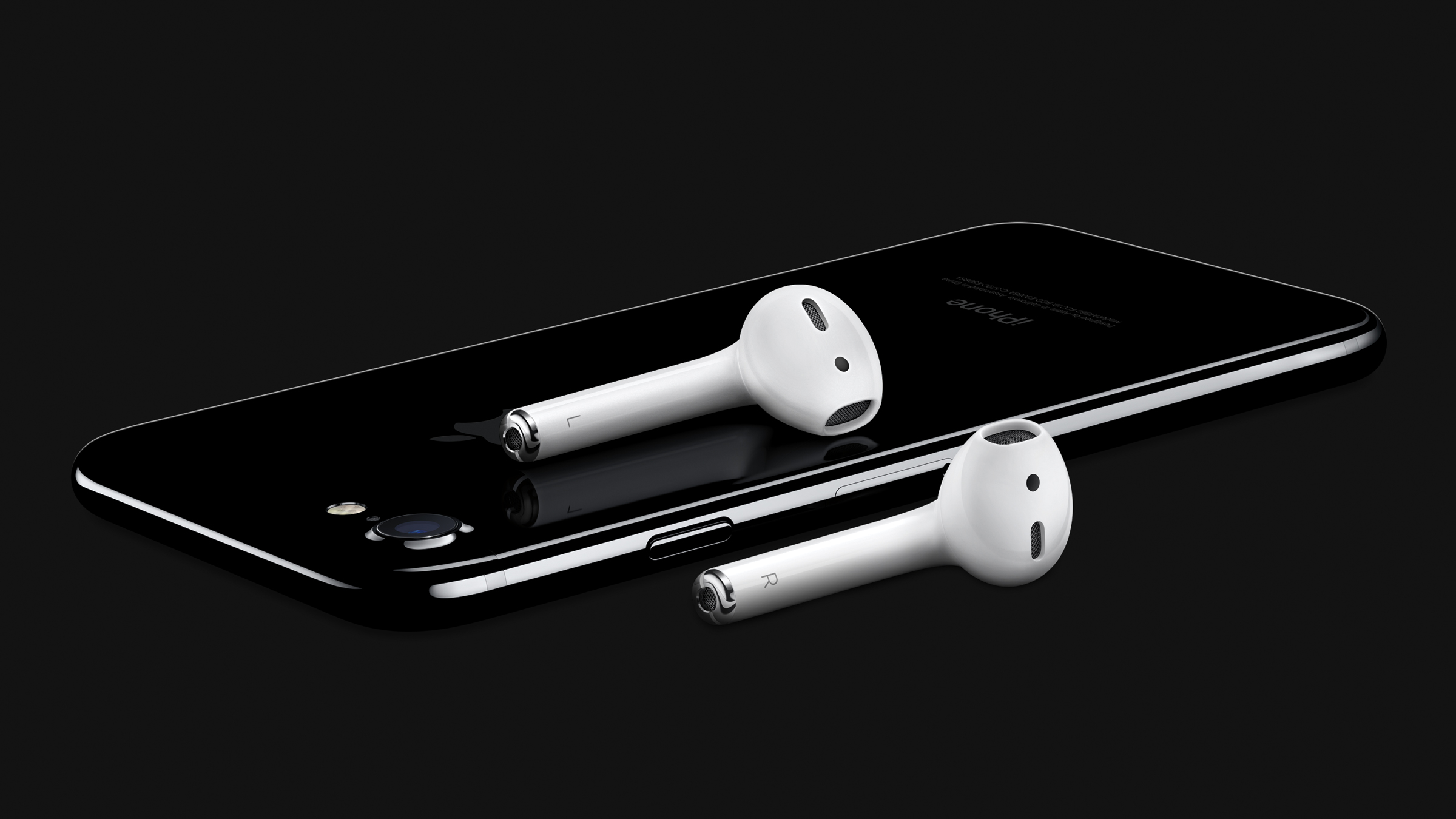
In comes the new A10 Processor, and out goes the 16GB model, (did anybody buy that?) and the headphone jack. Apple’s Phil Schiller delivered a very compelling pitch for the newly announced AirPods. Verdict? It’s the future of SmartPhones. Get with it.

Maybe you had to be there. Maybe not. But when I attended Apple’s event in San Francisco today, the new iPhone 7 line looked a lot better than the leaked specs had us believing it would—especially the iPhone 7 Plus.

So the question we ask with every new phone release—should I upgrade?—is more complicated this time. When the iPhone 6s appeared last year, I had no trouble advising people to get by without 3D Touch and Live Photos, and wait another year to buy.

But this year is different, and I’m not the only one who thinks so. “Internally they have put a lot of interesting things in there,” IDC analyst Tom Mainelli told me after Apple’s press event. “I think if somebody was on the fence, I would have no problem advising them to upgrade.”

Check this Topic at fastcompany.com

Image courtesy of fastcompany.com

Filed Under: iPhone 7 Tagged With: apple airpods, apple iphone 7 camera, apple iphone 7 plus review, apple iphone 7 review

HP Spectre 13 Review, HP Stuns With Worlds Thinnest Laptop

September 7, 2016 by Ian Orford Leave a Comment

hp spectre 13 review 2016

HP is definitely out to beat Apple at their own game by announcing a notebook that is just 10.4 millimeters thick beating the Apple MacBook 12 by close to 3 mm.

One look and we were besotted.

Despite its ultra ‘thinness’ however the diminutive HP Spectre 13 boats up to an i7 processor, 8gb RAM and a really nice screen with HD resolution. We love it, and the slick new HP logo? Pretty cool. Likes like HP is innovating again.

Notebook manufacturers are continuing to explore the limits of design in terms of reducing the thickness. The new HP Spectre 13 is currently the benchmark. With a “thickness” of just 10.4 millimetres, HP even clearly beats other thin laptops like the Apple MacBook 12 (up to 13 mm). That the diet was not an easy tasks is supported by some clever details. While the use of CNC machined aluminum and carbon is pretty much standard in this class of this devices by now, HP had to find a special solution for hinge because of the extremely thin display (2 millimetres) as well as the edge-to-edge design of the panel. The result is a so-called “Piston Hinge”, which folds into the base unit and is then guided or absorbed, respectively, by a special mechanism.

Check this Topic at notebookcheck.net

Image courtesy of notebookcheck.net

Filed Under: HP Tagged With: hp spcetre 13 review

HP Envy 15.6, 17.3 and Envy x360 Overview 2016

September 7, 2016 by Ian Orford Leave a Comment

hp envy 17.3 review 2016

The HP Envy range of Applesque premium designed laptops has certainly been a hit with buyers since the introduction of the range in 2009 followed by the rebranding of the Pavilion range into the Envy range in 2012.

So 4 years on, how has the Envy range stood up to the test of time and how do they look for 2016 and the 2017 models years? Well, the consensus has to be pretty good with refreshed designs in keeping with the premium look and feel, updated Skylake processors, slimmer overall and HP fast Charge for the 15″ and 17″ models.

The stunning x360 Convertable is 21% thinner, features Bang and Olufson speakers and the option of a 15.6″ 4K UHD Touchscreen. Mouth watering specifications indeed!

Outside of the headline-grabbing Spectre 13.3 as the “thinnest notebook ever”, HP also unveiled a new lineup of notebooks and convertibles as part of the manufacturer’s luxury Envy series for consumers.

The first of the three is the Envy x360 convertible, which has taken a more Spectre-like approach in design with its all-metal chassis and sharp edges. The refreshed chassis will be 21 percent thinner than the previous generation with 1080p and 4K UHD display options and longer battery life. Other features include keyboard keys with 1.5 mm travel (compared to 1.3 mm on the new Spectre 13.3) and an optional HD IR camera for Windows Hello.

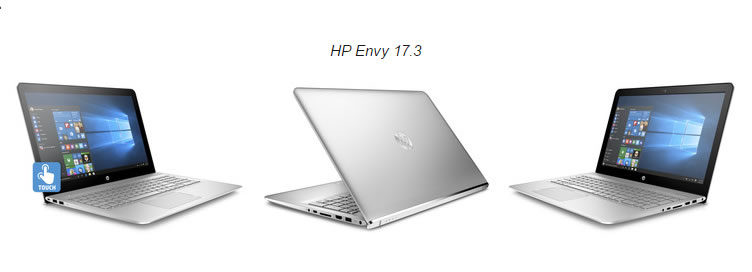
Next are the Envy 15.6 and Envy 17.3 notebooks with a similar all-metal design philosophy. Like their immediate predecessors, both systems will have a hooked bottom edge on their respective lids to lift the base at a slight angle during use. While this can potentially improve ergonomics and airflow, the feature prevents having any ports on the rear of the notebook. Touchscreen options are also available on these models despite the fact that they include no 2-in-1 features. An HD IR camera is again optional on the 15.6-inch model while Intel RealSense will be available on the larger 17.3-inch model. Both will support HP Fast Charge Technology to charge from empty to 90 percent in 90 minutes.

Check this Topic at notebookcheck.net

Image courtesy of notebookcheck.net

Filed Under: Envy

Lenovo ThinkPad Helix 2nd Generation Review

August 31, 2016 by Ian Orford Leave a Comment

lenovo thinkpad helix 2nd gen review

The Lenovo ThinkPad helix was the class defining system from Lenovo that introduced the concept of a convertible Business orientated laptop.

In other words, a device with a detachable keyboard that became in effect, a tablet.

So having established the concept and opened the doors to other manufacturers like Dell and Toshiba, how does the 2nd Generation ThinkPad Helix stand up to the competition? Read the full review by Hardware Analyst Brain Westover on PCMAG

The Lenovo ThinkPad Helix 2nd Gen ($1,549 as tested) is the latest version of the system that ushered in the business detachable-hybrid laptop category. The original ThinkPad Helix was not only the first business system to feature a detachable keyboard, but the first toallow the tablet to be attached facing forward or backward for multimode use. Since then, however, the designhas gone mainstream, as seen on systems like the Toshiba Portege Z20t-B2112 and the Editors’ Choice Dell Venue 11 Pro 7000 Series (7140). These newer systems not only offer more refined takes on the detachable concept, but they do so while delivering better performance. The ThinkPad Helix has come a long way, but can it keep up with the fast pace of the category it helped start?

Design and Features With the ThinkPad Helix, you can remove the display for use as a standalone tablet, or connect it to the docking keyboard for a traditional clamshell-laptop experience. It also adds a literal twisthence the Helix namein letting you connect the tablet facing forward or backward. This allows for multiple-use modes, similar to those seen on the Lenovo ThinkPad Yoga 12, including Stand and Tent mode, in addition to Laptop and Tablet modes.

Check this Topic at pcmag.com

Image courtesy of pcmag.com

Filed Under: ThinkPad

Coupling Dell’s XPS 13 Ultraportable plus 32″ UltraSharp UP3216Q 4K Screen

August 30, 2016 by Ian Orford Leave a Comment

dell xps 13 and 32-inch UltraSharp UP3216Q Monitor review
Ultimate Home Setup? Dell XPS 13 Laptop Plus 32-inch UltraSharp UP3216Q

The Dell XPS 13 Ultraportable has certainly seen some very positive reviews since it’s launch in 2015 and with the late4st iteration sporting up to a 1TB Solid State drive and the Intel’s Skylake plugged into the motherboard it’s certainly worthy of a very serious look as an everyday machine.

The challenge is, of course, is that as good as that 13″ screen is with its ultra-thin bezels it doesn’t have a huge amount of screen real estate.

So how about teaming the little Dell up with the new 4K 32-inch UltraSharp UP3216Q Monitor. That’s got to be a pretty cool combination? Let’s see what Shawn Knight, a veteran work at homer of Techspot has to say. And by the way, if your quick, Dell has told them they can give this killer combination away to one lucky reader!

The Internet has afforded me the ability to work from home for more than 15 years. What’s more, I can work from virtually anywhere so long as I have an Internet connection. As glamorous as it all sounds, working from home can also be stressful due to the amount of self-discipline it requires. Above all else, I’ve found that investing in efficiency pays off which in turn frees up time, the one asset that is both free and priceless.

Dell recently came knocking with one of the most highly regarded 4K monitors on the market, the UltraSharp UP3216Q. Measuring 31.5 inches diagonally with a resolution of 3,840 x 2,160 @ 60Hz, this display was already high on my list of potential candidates so the timing couldn’t have been better.

We are giving away this Dell bundle (XPS 13 laptop + Ultrasharp 4K monitor.

Dell’s proposition wasn’t simply to review the UltraSharp UP3216Q (although a standalone review is in the works) but rather, evaluate its performance and value as part of a larger package that just so happened to address the one area on my path to optimal productivity that I hadn’t yet mastered: portability.

Check this Topic at techspot.com

Image courtesy of techspot.com

Filed Under: XPS Tagged With: dell 4K 32-inch UltraSharp UP3216Q Monitor review, dell 4K 32-inch UP3216Q Monitor review and 13 xps workstation, dell xps 13 review

Why On Earth Is Google Building A New Operating System From Scratch?

August 24, 2016 by Ian Orford Leave a Comment

new google operating system fuchsia


Fuchsia, the new Google Operating System?

Google quietly revealed last week that they have a brand new, and we mean brand new, operation system in development code named Fuchsia writes Jared Newman of Fast Company. Is this totally insane or the smartest move Google has ever made? Why a brand new operating system and especially one that will already compete with one of the world’s leading operating systems, Android?

Well, when you dig deeper the answer becomes obvious. You see, every operating system out there actually relies on and is built on old code. Or to get more technical, a ‘kernel’ that could, in fact, be decades old.

So the Google Geeks have decided to go right back to basics and start over. from the beginning, from scratch, as if this was the first operating system written. This time they will be writing the new code and kernel for the internet of things.
<blockquote class=”curated_content”>Last week, a group of Googlers did something strange: They quietly revealed a new operating system that theoretically competes with Google’s own Android OS.

Dubbed Fuchsia, the open-source OS-in-progress could run on everything from lightweight, single-purpose devices (think ATMs and GPS units) all the way up to desktop computers. But unlike Android, Fuchsia isn’t based on Linux, nor is it derived from any of the other software that underpins nearly all personal computing and communications today. Instead, it’s an attempt to start from scratch.

Google has yet to make any big announcements about how it might use Fuchsia, which is still in early development and could be nothing more than an experiment. Still, Google has plenty of reasons to hit reset on decades of software history.</blockquote>

Filed Under: Operating Systems Tagged With: google fuchsia, google fuchsia operating system, google operating system

Asus ZenBook UX305 – Full Review and Benchmarks

August 22, 2016 by Ian Orford Leave a Comment

Which Asus laptop is Best For You?

Taiwanese Tech company Asus makes consistently high-quality Laptops, so much so that have recently hit the number 3 spot in the LaptopMag 2016 Brand Rating Category. Apple and MSI narrowly beating them with higher scores. Where Asus wins hands down of course is the absolute value for money.

Anna Attkisson, Managing Editor of LaptopMag gives the Asus Zenbook UX305 ‘Best Overall’ rating for style, power, and incredible value. Anna isn’t the only tech writer to recommend the sleek, beautifully finished Zenbook UX305 Ultrabook either with Digital Trends awarding this great little notebook ‘Best Laptop’ for CES 2016.

The ZenBook UX305 stuns with a gorgeous all-aluminum body, a thin, fanless design, and 9-plus hours of battery life — all for just $699.

The UX305 isn’t perfect, but it’s the best Ultrabook value yet. The UX305’s design is an exercise in simplicity; there isn’t a single unnecessary protuberance, and its lines and curves flow from edge to edge with an elegant fluidity. Finished in dark obsidian stone, the UX305 continues the ZenBook tradition by featuring a gorgeous aluminum body and a delicately thin waistline.

Check this Topic at laptopmag.com

Image courtesy of laptopmag.com

Filed Under: Asus Tagged With: asus laptop review, asus zenbook ux305 review, best asus laptop 2016

Lenovo ThinkPad X1 Yoga Review – No-nonsense Business Machine

August 18, 2016 by Ian Orford Leave a Comment

lenovo thinkpad x1 yoga review

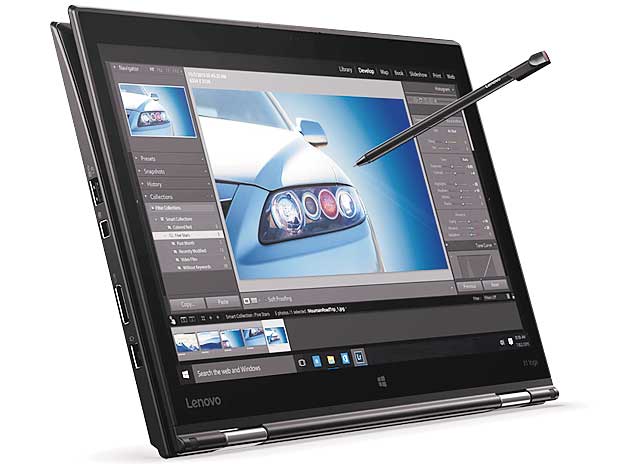
Indian Business site Business Standard gives the Lenovo ThinkPad X1 Yoga the thumbs up and says that it’s no wonder IT departments Sysadmins love it. Now that the trend for bringing your own technology into the workplace has become common practice, the ease of which the stunningly versatile X1 yoga can be integrated into your companies IT infrastructure will make your IT department breath a sigh of relief.

With all the flexibility of the Yoga form factor and the build quality of the ThinkPad with its superb keyboard and touch screen, the ThinkPad X1 Yoga is a winning combination.

Top-of-the-line specifications? Check. Convertible? Check. Fingerprint scanner? Check. IT department loves it? Umm. Since the advent of the practice of “bringing your own device”, system administrators all over the world have had a torrid time configuring and adapting to employees’ needs. A schoolmate who works as a consultant now often narrates a story from a decade ago when he had his company’s sysadmin stumped because he wanted to use his high-end gaming notebook in office. And no, he didn’t want the company-provided ThinkPad as it was “boring”.That …

Check this Topic at business-standard.com

Image courtesy of business-standard.com

Filed Under: ThinkPad Tagged With: lenovo thinkpad, lenovo thinkpad x1, lenovo thinkpad x1 yoga review, thinkpad x1 yoga

  • « Previous Page
  • 1
  • 2
  • 3
  • 4
  • 5
  • 6
  • Next Page »

Search Topics

Connect With Us Online

  • Facebook
  • Instagram
  • Pinterest
  • YouTube

Features

  • Switch From MacBook To Windows – And Why You Should – Roundup March 18, 2017
  • Try And Break This! Dell Latitude Rugged Laptop March 15, 2017
  • Laptop Tech Support: 2017 Reviews – Apple Hits The Spot Again March 13, 2017
  • Apple Is Dead To Me… And why NOT to buy a MacBook March 13, 2017
  • Dell Inspiron 15 7000 Gaming (7567) Review – Best Budget Gamer? March 10, 2017

Topic Categories

  • Acer
  • Alienware
  • Apple
  • Asus
  • Dell
  • EliteBook
  • Envy
  • Hard Drives
  • HP
  • IdeaPad
  • Inspiron
  • iPhone 7
  • Laptop Graphics
  • Laptop Processor
  • Latitude
  • Lenovo
  • MacBook
  • MacBook Pro
  • MSI
  • Omen
  • Operating Systems
  • Pavilion
  • Samsung
  • Surface
  • Surface Book
  • Tech Topics
  • ThinkPad
  • Toshiba
  • XPS
  • Yoga

Tech Topics

It's showdown time again with their yearly tech support showdown Laptop Mag … [Read Topic...]

Laptop Topics

  • About
  • Contact Us

Our Partners

laptop topics laptop topics laptop topics

Copyright © 2026 · News Pro Theme on Genesis Framework · WordPress · Log in