• Apple
    • MacBook
    • MacBook Air
    • MacBook Pro
  • Acer
    • Aspire
    • TravelMate
    • Predator
  • Asus
  • Dell
    • Alienware
    • Inspiron
    • Latitude
    • XPS
  • HP
    • EliteBook
    • Envy
    • Omen
    • Pavilion
    • ProBook
    • Stream
    • ZBook
  • Lenovo
    • IdeaPad
    • ThinkPad
    • Yoga
  • Microsoft
    • Surface Book
    • Surface
  • Samsung
  • Toshiba
  • Tech Topics
    • Laptop Graphics
    • Hard Drives
    • Laptop Processor
    • Operating Systems

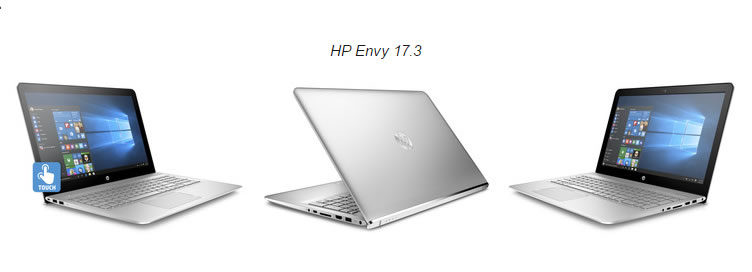
HP Envy 15.6, 17.3 and Envy x360 Overview 2016

September 7, 2016 by Ian Orford Leave a Comment

hp envy 17.3 review 2016

The HP Envy range of Applesque premium designed laptops has certainly been a hit with buyers since the introduction of the range in 2009 followed by the rebranding of the Pavilion range into the Envy range in 2012.

So 4 years on, how has the Envy range stood up to the test of time and how do they look for 2016 and the 2017 models years? Well, the consensus has to be pretty good with refreshed designs in keeping with the premium look and feel, updated Skylake processors, slimmer overall and HP fast Charge for the 15″ and 17″ models.

The stunning x360 Convertable is 21% thinner, features Bang and Olufson speakers and the option of a 15.6″ 4K UHD Touchscreen. Mouth watering specifications indeed!

Outside of the headline-grabbing Spectre 13.3 as the “thinnest notebook ever”, HP also unveiled a new lineup of notebooks and convertibles as part of the manufacturer’s luxury Envy series for consumers.

The first of the three is the Envy x360 convertible, which has taken a more Spectre-like approach in design with its all-metal chassis and sharp edges. The refreshed chassis will be 21 percent thinner than the previous generation with 1080p and 4K UHD display options and longer battery life. Other features include keyboard keys with 1.5 mm travel (compared to 1.3 mm on the new Spectre 13.3) and an optional HD IR camera for Windows Hello.

Next are the Envy 15.6 and Envy 17.3 notebooks with a similar all-metal design philosophy. Like their immediate predecessors, both systems will have a hooked bottom edge on their respective lids to lift the base at a slight angle during use. While this can potentially improve ergonomics and airflow, the feature prevents having any ports on the rear of the notebook. Touchscreen options are also available on these models despite the fact that they include no 2-in-1 features. An HD IR camera is again optional on the 15.6-inch model while Intel RealSense will be available on the larger 17.3-inch model. Both will support HP Fast Charge Technology to charge from empty to 90 percent in 90 minutes.

Check this Topic at notebookcheck.net

Image courtesy of notebookcheck.net

Filed Under: Envy

HP Envy 13 (2016) review

May 17, 2016 by Leave a Comment


There’s an absolute plethora of Mac-a-likes hitting the market and the HP Envy is the latest to try and seduce us with a classy aluminium finish and a thin and light format. And why not? The industry is renowned for copying success and lets face it, MacBooks as a product have been incredibly successful for Apple. Josh Miller at CNET however seems to think that whilst the Envy 13 has a lot to recomend it, just isnt good enough to stack up against the competition. Check out why below.

Last year, something wonderful happened in the world of Windows laptops. Quality became affordable. Companies like Dell, HP and Asus started selling sleek notebooks made of strong aluminum and carbon fiber for less than $1,000.

The HP Envy 13 is the latest of those computers to enter the ring. It starts at just $800 (£699) for a no-compromise configuration that comes with a 2.3GHz 15-watt Intel Core i5 processor, 8GB of memory, 128GB of speedy solid-state storage, and a crisp 1080p screen — all in a chassis that weighs just 2.8 pounds and measures 12.9mm thick. It’s one of the thinnest laptops ever made.

But after spending a week with the HP Envy 13, I can’t quite recommend it. It’s just not as good as the competition. (Skip to the conclusion to find out what to buy instead.)

There’s no one giant glaring deal breaker that ruins the Envy 13. In fact, there’s a lot to love.My favorite feature: a fingerprint sensor that lets me swipe my way into Windows instead of typing a password. It’s one of the most responsive I’ve used on a consumer PC.

Check this Topic at cnet.com

Image courtesy of cnet.com

Filed Under: Envy Tagged With: hp envy 13 review

Search Topics

Connect With Us Online

  • Facebook
  • Instagram
  • Pinterest
  • YouTube

Features

  • Switch From MacBook To Windows – And Why You Should – Roundup March 18, 2017
  • Try And Break This! Dell Latitude Rugged Laptop March 15, 2017
  • Laptop Tech Support: 2017 Reviews – Apple Hits The Spot Again March 13, 2017
  • Apple Is Dead To Me… And why NOT to buy a MacBook March 13, 2017
  • Dell Inspiron 15 7000 Gaming (7567) Review – Best Budget Gamer? March 10, 2017

Topic Categories

  • Acer
  • Alienware
  • Apple
  • Asus
  • Dell
  • EliteBook
  • Envy
  • Hard Drives
  • HP
  • IdeaPad
  • Inspiron
  • iPhone 7
  • Laptop Graphics
  • Laptop Processor
  • Latitude
  • Lenovo
  • MacBook
  • MacBook Pro
  • MSI
  • Omen
  • Operating Systems
  • Pavilion
  • Samsung
  • Surface
  • Surface Book
  • Tech Topics
  • ThinkPad
  • Toshiba
  • XPS
  • Yoga

Tech Topics

It's showdown time again with their yearly tech support showdown Laptop Mag … [Read Topic...]

Laptop Topics

  • About
  • Contact Us

Our Partners

laptop topics laptop topics laptop topics

Copyright © 2026 · News Pro Theme on Genesis Framework · WordPress · Log in