• Apple
    • MacBook
    • MacBook Air
    • MacBook Pro
  • Acer
    • Aspire
    • TravelMate
    • Predator
  • Asus
  • Dell
    • Alienware
    • Inspiron
    • Latitude
    • XPS
  • HP
    • EliteBook
    • Envy
    • Omen
    • Pavilion
    • ProBook
    • Stream
    • ZBook
  • Lenovo
    • IdeaPad
    • ThinkPad
    • Yoga
  • Microsoft
    • Surface Book
    • Surface
  • Samsung
  • Toshiba
  • Tech Topics
    • Laptop Graphics
    • Hard Drives
    • Laptop Processor
    • Operating Systems

Lenovo Yoga Book Review: A 2-In-1 With A Trick

November 29, 2016 by Ian Orford Leave a Comment

hothardware.com

Is the new Lenovo Yoga Book a laptop, a tablet, or a convertible hybrid? With a digital keyboard that actually doubles as a sketchpad, Lenovo in typical fashion is pushing the boundaries and testing the market by actually getting innovative new products into our hands.

With tablet performance from it’s Intel Atom x5-Z8550 processor and Intel HD 400 Graphics, it’s not going to compete very well with most Windows 10 hybrids, but as Joshua Gulick of HotHardware says, with the ‘Real pen’ and sketching ability even on real paper, the Lenovo Yoga Book becomes much more than just your everyday tablet…

Lenovo recently released one of the most interesting tablet hybrids in recent memory, just in time for the holidays. The Yoga Book has a digital keyboard that doubles as a sketch pad that even accommodates plain old paper, giving users several ways to draw images or jot notes. In fact, the tablet aspect of the machine is one of the most creative (and fun) concepts we’ve seen this year. read more at hothardware.com


Filed Under: Yoga Tagged With: lenovo yoga book

Lenovo Yoga 710 14 Review

October 12, 2016 by Ian Orford Leave a Comment

lenovo yoga 710 14 reviewLenovo started a trend and singlehandedly created a new breed of notebooks when it launched the Yoga concept and that now well-established tradition continues with the upmarket and beautifully designed Lenovo Yoga 710 14″.
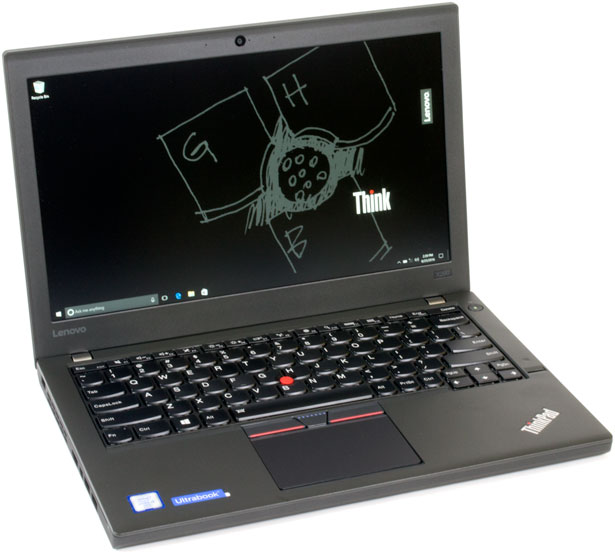
With it’s upmarket magnesium-aluminum construction, classic lines, solid performance and market leading price, the Yoga 710 looks like being another class leader for Lenovo. What we particularly like about this iteration of Lenovo’s Yoga brand is the fact that it manages to stand comparison with the likes of the Yoga 900 and the HP Spectre x360, yet remain well below their cost, without losing much of the same luxury look and feel.

Take a look at Charles P Jefferies full review of the Lenovo Yoga 710 14″ over at Notebookreview…
<blockquote class=”curated_content”>The new Yoga 710 series is the replacement for the older Yoga 700, which debuted at the end of 2015. The “Yoga” in the name isn’t merely for show, as these notebooks are capable of folding their displays 360 degrees around to transform into a tablet, or two in-between modes. The model we’re reviewing features a 14-inch display, but the 710 series is also available in 11- and 15.6-inch models.

The key selling points of the Lenovo Yoga 710 14 are its premium magnesium-aluminum chassis, stylish design, good quality display, and excellent battery life. It’s too thick and heavy to be considered as a dedicated tablet replacement, but that complaint isn’t unique to this convertible PC. As a matter of fact, we’ve said that about almost every convertible PC we’ve reviewed. The convertible modes should be viewed as a bonus.</blockquote>

Filed Under: Yoga Tagged With: lenovo yoga 710 14 2017, lenovo yoga 710 14 review

Lenovo IdeaPad 710S Review: A High-Value Ultrabook

October 11, 2016 by Ian Orford Leave a Comment

Lenovo’s IdeaPad 710s brings a lightweight premium look and feel to their already extensive range of great looking Ultrabooks.

Lenovo really did a great job of branding their consumer laptops by borrowing the cache from the ThinkPad brand when they bought the business from IBM back in 2005. The first IdeaPads launched in 2008 with some innovative features that can be said to have led the way in lightweight ultrabook design.

The new IdeaPad 710s continues the value look and feel with a laptop that feels so light you have to remind yourself it is actually made of metal, albeit lightweight magnesium and aluminium. Lenovo has a habit of bringing incremental improvements to its notebooks and the 710s is no exception. With its sleek lines and an almost opulent appearance, it’s no slouch in the performance stakes either.

With its Skylake processors, 16GB of RAM available and fast SSD storage, the IdeaPad 710s is a cracking performer and looks like it could be a winner for Lenovo.

The ideapad 710S is a new premium Ultrabook from Lenovo. It features a classy magnesium-aluminum construction, a near bezel-less display, and is just 2.6 pounds and 0.55 inches thin. On the inside, it packs Intel’s latest “Skylake” Core i-series processors, up to 16GB of RAM, and PCI-express SSD storage. We gave this sleek beauty high marks for just about everything, minus some keyboard layout quibbles, and its subpar selection of ports.

We initially thought the ideapad 710S was plastic when we took it out of the box. It’s lighter than the average 13.3-inch notebook, at 2.6 pounds. This puts it just slightly under the Dell XPS 13 (2016), and the Acer Aspire S 13, two of its closest competitors. Rather than plastic, however, the all-silver ideapad 710S uses magnesium and aluminum. This helps keep the weight down, and also strengthens the chassis. Indeed, the base of the notebook is rigid, with just a bit of side-to-side play when we torqued it by its corners (which you should avoid doing, by the way). The lid has a bit of flex to it, but actually provides excellent protection to the display panel.

We weren’t able to get ripples to appear in the display by pressing in on the back of the lid. This is even more impressive in view of the lid’s thinness. Another impressive fact about the lid is that it tilts 90 degrees past vertical, allowing it to lay completely flat with the surface. This is unusual, as most notebooks tend to stop around the 45 degree mark, or shortly thereafter. The lid’s hinge is a bit too stiff to allow it to be opened one-handed, though.


Check this Topic at notebookreview.com

Image courtesy of notebookreview.com

Filed Under: IdeaPad Tagged With: lenovo ideapad 710s review, lenovo ideapad 710s ultrabook

Lenovo ThinkPad X260 Review 2016

October 6, 2016 by Leave a Comment

The X Series range of ThinkPad laptops was the precursor to today’s modern Ultraportable. Launched in September 200 the first X series was the X20.

So, 17 years on how has this icon grown up up? Well the new Thinkpad X260, accordung to Joshua Gulick of hothardware.com, has grown up remarkably well. Lenovo have managed to build a superb and top performibng ultrportable, without sacrificing any of iots lengedary build quality

Check this Topic at hothardware.com

Image courtesy of hothardware.com

Filed Under: ThinkPad Tagged With: thinkpad x series, thinkpad x260 review

Lenovo ThinkPad Helix 2nd Generation Review

August 31, 2016 by Ian Orford Leave a Comment

lenovo thinkpad helix 2nd gen review

The Lenovo ThinkPad helix was the class defining system from Lenovo that introduced the concept of a convertible Business orientated laptop.

In other words, a device with a detachable keyboard that became in effect, a tablet.

So having established the concept and opened the doors to other manufacturers like Dell and Toshiba, how does the 2nd Generation ThinkPad Helix stand up to the competition? Read the full review by Hardware Analyst Brain Westover on PCMAG

The Lenovo ThinkPad Helix 2nd Gen ($1,549 as tested) is the latest version of the system that ushered in the business detachable-hybrid laptop category. The original ThinkPad Helix was not only the first business system to feature a detachable keyboard, but the first toallow the tablet to be attached facing forward or backward for multimode use. Since then, however, the designhas gone mainstream, as seen on systems like the Toshiba Portege Z20t-B2112 and the Editors’ Choice Dell Venue 11 Pro 7000 Series (7140). These newer systems not only offer more refined takes on the detachable concept, but they do so while delivering better performance. The ThinkPad Helix has come a long way, but can it keep up with the fast pace of the category it helped start?

Design and Features With the ThinkPad Helix, you can remove the display for use as a standalone tablet, or connect it to the docking keyboard for a traditional clamshell-laptop experience. It also adds a literal twisthence the Helix namein letting you connect the tablet facing forward or backward. This allows for multiple-use modes, similar to those seen on the Lenovo ThinkPad Yoga 12, including Stand and Tent mode, in addition to Laptop and Tablet modes.

Check this Topic at pcmag.com

Image courtesy of pcmag.com

Filed Under: ThinkPad

Lenovo ThinkPad X1 Yoga Review – No-nonsense Business Machine

August 18, 2016 by Ian Orford Leave a Comment

lenovo thinkpad x1 yoga review

Indian Business site Business Standard gives the Lenovo ThinkPad X1 Yoga the thumbs up and says that it’s no wonder IT departments Sysadmins love it. Now that the trend for bringing your own technology into the workplace has become common practice, the ease of which the stunningly versatile X1 yoga can be integrated into your companies IT infrastructure will make your IT department breath a sigh of relief.

With all the flexibility of the Yoga form factor and the build quality of the ThinkPad with its superb keyboard and touch screen, the ThinkPad X1 Yoga is a winning combination.

Top-of-the-line specifications? Check. Convertible? Check. Fingerprint scanner? Check. IT department loves it? Umm. Since the advent of the practice of “bringing your own device”, system administrators all over the world have had a torrid time configuring and adapting to employees’ needs. A schoolmate who works as a consultant now often narrates a story from a decade ago when he had his company’s sysadmin stumped because he wanted to use his high-end gaming notebook in office. And no, he didn’t want the company-provided ThinkPad as it was “boring”.That …

Check this Topic at business-standard.com

Image courtesy of business-standard.com

Filed Under: ThinkPad Tagged With: lenovo thinkpad, lenovo thinkpad x1, lenovo thinkpad x1 yoga review, thinkpad x1 yoga

Lenovo ThinkPad T560 – Full Review and Benchmarks

July 10, 2016 by Ian Orford Leave a Comment

When we ‘think’ of ThinkPad laptops here at Laptop Topics our first thought is always of the doyen of corporate laptops, the ThinkPad T400 and T500 Series. With 14-inch and 15-inch screens, rock solid build quality, reliability and performance as a mainstream business laptop there is very little that comes close.

Avram Piltch at Laptop Mag wax’s lyrical about the Thinkpad T560’s staggering battery life, outstanding display and comfortable keyboard and believes that if you want the ultimate 15-inch productivity laptop, the ThinkPad T560 is your best choice.”

If you want the ultimate 15-inch productivity laptop, the ThinkPad T560 is your best choice.

Lenovo’s 14-inch ThinkPad T460 is our favorite business laptop overall, because of its epic battery life, tough chassis, solid performance and snappy keyboard. But for those who want a productivity-centric system with a larger screen, the 15.6-inch ThinkPad T560 offers a similarly excellent combination of usability, durability and security. Starting at a reasonable $809 ($1,286.10 as tested), the T560 one-ups its smaller sibling with a numeric keypad for number crunchers, an optional 3K display and over 21 hours of battery life — the longest of any laptop we’ve tested.

The ThinkPad T560 has the same classic, raven-black ThinkPad aesthetic as most of Lenovo’s other business laptops. It has only a few dashes of color, provided by its bright-red status light and TrackPoint nub, so it won’t wow the hipsters at the coffee shop. However, if you’re buying the T560, you’re probably more interested in durability and usability than style.

Check this Topic at laptopmag.com

Image courtesy of laptopmag.com

Filed Under: ThinkPad Tagged With: lenovo thinkpad t560

Lenovo IdeaPad Y700-17 (80Q0001NUS) Review & Rating

June 24, 2016 by Ian Orford Leave a Comment

lenovo ideapd y700-17

The Lenovo IdeaPad Y700-17 is a powerful entry level gaming system, that according to Matt Buzzi of PCMAG can run demanding games at reasonably high settings. With a Nvidia GeForce GTX 960M graphics card plus an Intel Core i7 processor, the Y700-17 gives excellent performance. You’ll need the room in your budget and more room in your laptop case because this is a large heavy machine that you won;t want to be carrying around too much, but if you want the screen estate and space of a 17″ screen, this strong performing gaming notebook could be it.

Nice price. Fast performance. Plenty of storage, including a solid-state boot drive. Impressive sound system.

The Lenovo IdeaPad Y700-17 is an excellent entry-level gaming laptop with a big screen and fast hardware. It can play demanding games smoothly at moderate to high settings, and you get plenty of storage, good port options, and a killer sound system in the bargain.

The 17-inch Lenovo IdeaPad Y700-17 ($1,164.99 as tested) is a powerful entry-level gaming laptop that can run demanding games smoothly at moderate to high settings, thanks to its Nvidia GeForce GTX 960M graphics card and Intel Core i7 processor. The hardware is fast, performing well in our benchmark tests, and it includes plenty of storage in the form of both a traditional spinning hard drive and a solid-state drive (SSD). It also has a wide range of port options, and the sound system, which includes a subwoofer, is impressive. The much moreaffordable 15-inch Dell Inspiron 15 7000 Series (7559) remains our Editors’ Choicegiven itsexcellent performance for the price. Still, the IdeaPad Y700-17 is a strong performer that won’t disappoint if you have more room in your budget and want a larger screen.

Check this Topic at pcmag.com

Image courtesy of pcmag.com

Filed Under: IdeaPad

Lenovo ThinkPad P40 Yoga Review: Is It Good for Business?

May 19, 2016 by Leave a Comment

Business News Daily tech writer Brett Nuckles gives the Lenovo ThinkPad P40 Yoga Workstation and very favourable review. Why?

Well despite not being as powerful as it’s siblings in the new Think P Workstation Series, and of course some of the competition out there like the Dell Workstations and the HP ZBook Studio Lenovo has made a superb job of fitting a powerful workstation machine into the extremely flexible Yoga form factor

Lenovo’s ThinkPad P40 combines the power of a desktop workstation with the flexibility of a pen-equipped tablet. The laptop provides graphics performance that’s good enough for intensive 3D modeling and CAD work for engineers while its 360-degree hinge gives you easy access to the system’s 14-inch display for sketching and taking notes.

The P40 Yoga’s flexible hinge lets you use the device in a handful of different orientations. Tent mode, shown above, is useful for using touch-screen apps or showing off a presentation to a small group. Meanwhile, stand mode (below) provides a nice angled surface for writing and taking notes with the included active pen.

Check this Topic at businessnewsdaily.com

Image courtesy of businessnewsdaily.com

Filed Under: Lenovo Tagged With: lenovo thinkpad p40 review, lenovo thinkpad p40 yoga, thinkpad p series

Lenovo ThinkPad X1 reviewed: a hybrid for the workaholics among us

May 17, 2016 by Ian Orford Leave a Comment


PC companies want to make products that combine the best of both worlds and we’re talking about multiple dichotomies, too: thin but powerful, business-ready but play-capable, high-end but also (semi) affordable, tablet but also a laptop, and more. We’ve seen it recently with Microsoft’s Surface Book and Surface Pro line of hybrids, HP’s newest Spectre laptop, and many more. Lenovo’s designs (the Yoga line in particular) have always been good at marrying these elements to one another, and its ThinkPad X1 tablet is an attempt to deliver a Surface competitor for businesses.

When we talk about ‘thin and light’ business laptops Lenovo leads the way with the X1 Carbon. The X1 Hybrid takes the concept a step further with the now familiar tablet with detachable keyboard further with the addition of custom modules. Valentina Palledino of Ars Technica says that she’s not sure she would want it to replace her regular Laptop. To be honest we’re not sure that is where the X1 Hybrid fits.

The traditional clamshell laptop design has always in our opinion been the platform for content creation, whereas the Tablet was originally conceived for content consumption. The Hybrid of course like the Surface Pro tries to fits somewhere in the middle. Whilst we love the idea of being able to attach and use the keyboard for ‘on the road’ use, we would have to agree with Ms Valentina. What we do love about the X1 is the sheer build quality, the keypad, and that projector. Not our full-time choice, but certainly a great pick for the road warrior.

Watch this on The Scene.

The X1 takes the convenience of a tablet, incorporates a metal kickstand, and attaches a solid keyboard to the bottom so it can become a laptop at any time. So as not to overwhelm consumers with a ton of unnecessary features, Lenovo build three custom “modules” for the X1 which can turn it into a projector, a 3D scanner, and a longer-lasting, port-happy work device. Without any modules, the X1 starts off at a hefty $1,029. I recently lived with the mid-tier module ($1,349) for awhile and, although it’s a powerful and capable device, I’m not sure I’d want it to replace my regular laptop.

Check this Topic at arstechnica.com

Image courtesy of arstechnica.com

Filed Under: ThinkPad

  • 1
  • 2
  • Next Page »

Search Topics

Connect With Us Online

  • Facebook
  • Instagram
  • Pinterest
  • YouTube

Features

  • Switch From MacBook To Windows – And Why You Should – Roundup March 18, 2017
  • Try And Break This! Dell Latitude Rugged Laptop March 15, 2017
  • Laptop Tech Support: 2017 Reviews – Apple Hits The Spot Again March 13, 2017
  • Apple Is Dead To Me… And why NOT to buy a MacBook March 13, 2017
  • Dell Inspiron 15 7000 Gaming (7567) Review – Best Budget Gamer? March 10, 2017

Topic Categories

  • Acer
  • Alienware
  • Apple
  • Asus
  • Dell
  • EliteBook
  • Envy
  • Hard Drives
  • HP
  • IdeaPad
  • Inspiron
  • iPhone 7
  • Laptop Graphics
  • Laptop Processor
  • Latitude
  • Lenovo
  • MacBook
  • MacBook Pro
  • MSI
  • Omen
  • Operating Systems
  • Pavilion
  • Samsung
  • Surface
  • Surface Book
  • Tech Topics
  • ThinkPad
  • Toshiba
  • XPS
  • Yoga

Tech Topics

It's showdown time again with their yearly tech support showdown Laptop Mag … [Read Topic...]

Laptop Topics

  • About
  • Contact Us

Our Partners

laptop topics laptop topics laptop topics

Copyright © 2026 · News Pro Theme on Genesis Framework · WordPress · Log in