• Apple
    • MacBook
    • MacBook Air
    • MacBook Pro
  • Acer
    • Aspire
    • TravelMate
    • Predator
  • Asus
  • Dell
    • Alienware
    • Inspiron
    • Latitude
    • XPS
  • HP
    • EliteBook
    • Envy
    • Omen
    • Pavilion
    • ProBook
    • Stream
    • ZBook
  • Lenovo
    • IdeaPad
    • ThinkPad
    • Yoga
  • Microsoft
    • Surface Book
    • Surface
  • Samsung
  • Toshiba
  • Tech Topics
    • Laptop Graphics
    • Hard Drives
    • Laptop Processor
    • Operating Systems

Should I Buy a Chromebook? Buying Guide and Advice

May 19, 2016 by Ian Orford 1 Comment

chrome bookBased on Linux and first appearing  in 2007 Google is finally maturing Chrome into a usable operating system.

A Chromebook certainly will not suit everybody and is definitely not for the power user. However if you’re looking for a cheap and cheerful budget laptop that has great battery life and is configured to use Google Apps and you have a good internet connection then check out what Henry Casey of LaptopMag has to say about the Chrome OS and whether a Chromebook is a good fit for you.

A Chromebook is a laptop of a different breed. Instead of Windows 10 or Mac OS X, Chromebooks run Google’s Chrome OS. These machines are designed to be used primarily while connected to the Internet, with most applications and documents living in the cloud. As a result, these clamshells don’t have a ton of onboard storage, but they don’t have very large price tags, either.

Low prices, long battery life and Windows 10 confusion have many people considering a Chromebook. In fact, according to the NPD research firm, Chromebook sales topped Windows notebook sales during the early summer of 2015. But is a Chromebook right for you? As PC manufacturers release Windows 10 notebooks priced to compete with Chromebooks, are there any that stack up? And how do you pick the best model for your needs and budget?

Our Chromebook buying guide has the answers to these and other questions.

Check this Topic at laptopmag.com

Image courtesy of laptopmag.com

Filed Under: Operating Systems, Tech Topics Tagged With: chrome os, chromebook

MacBook Pro 2016 release date, news and rumors

May 18, 2016 by Ian Orford Leave a Comment

The news all Apple fans have been waiting for, the eagerly awaited and much anticipated (assumed) redesign of the Apple flagship MacBook Pro range of laptops. Most upgrades over the last couple of years have been purely incremental and it’s really a testament to the superb design of the original MacBooks that they still look as good today.

The rumour mill is in full swing with stories of a newly designed hinge from the company who manufactures the hinge for the Surface Pro, to the number of USB ports, and of course conjecture about the available case colors.

Update: Apple is apparently enlisting the services of Amphenol, which makes hinges for Microsoft’s Surface Pro devices, to manufacture hinges for its rumored super-slim MacBooks.

Apple’s MacBook Pro range hasn’t been updated for some time: the 13-inch MacBook Pro with Retina was refreshed in March 2015 and the 15-inch in May. New MacBook Pros are clearly imminent. The biggest change is likely to be in the Pros’ processors, and while there are rumours of detachable touchscreens we’d take them with a hefty pinch of salt.

According to one report by DigiTimes, Apple is gearing up to release new 13- and 15-inch MacBooks in the second half of 2016. It reckons they will feature hinges produced using a mechanism called ‘metal injection moulding’. Said to be inspired by Microsoft’s Surface Pro line of devices, the hinges will apparently be manufactured by Ampenol, who makes hinges for Microsoft’s convertible tablet.

The MacBook Pro is due an update, and we think it’ll be a big one. Will the new model be a radical redesign?

Check this Topic at techradar.com

Image courtesy of techradar.com

Filed Under: MacBook Pro Tagged With: apple macbook pro 15, apple macbook pro 2016 review, apple macbook pro redesign, apple macbook pro redsign, apple macbook pro update

Apple MacBook Pro (15-inch, 2015) review

May 18, 2016 by Ian Orford Leave a Comment


The Apple MacBook Pro 15-inch is currently looking like it needs an upgrade and Apple fans are eagerly awaiting the release and news of the upcoming 2016 MacBook. The paucity of real updates, including the lack of a 5th Gen i7 still means the 15-inch MacBook “remains Apple’s biggest and most powerful laptop, and a great all day, everyday productivity machine” says Dan Ackerman of CNET.

We can safely say that we are looking forward to the release date of the MacBook Pro 2016 as much as anybody else in the industry.

Apple’s MacBook Air and Pro lines have remained steadfastly rock-solid in their look and feel for several generations. Each year brings a handful of tweaks and updates, typically only to internal components, from better hard drives to faster Wi-Fi to new processors. It’s only because both the Air and Pro designs were so far ahead of the curve when first introduced that these laptops still look so up-to-date.

For 2015, nearly every MacBook has received an update of a some kind, although these have largely been of the blink-and-you’ll-miss-it variety. Both theMacBook Air and 13-inch MacBook Pro have moved up to Intel’s fifth-generation Core i-series processors, also known by the codename Broadwell, while the 13-inch Pro also added Apple’s new Force Touch trackpad.

That clickless touchpad, which uses four sensors and some haptic feedback rather than a traditional hinge, was one of the highlights of the new12-inch MacBook , a low-power, 2-pound ultraportable that was Apple’s sole new laptop design in years.

Compared to all the changes listed above, and the entirely new 12-inch MacBook, the 15-inch MacBook Pro feels like it’s been slighted in the update department. The 15-inch Pro gets the Force Touch trackpad, and a faster solid-state hard drive, plus updated graphics in the form of an AMD Radeon R9 M370X GPU. But arguably the most important component upgrade is missing, as the Core i7 CPU here is the same as last year’s model (the fifth-gen Core i7 chips from Intel are only starting to trickle out now).

Check this Topic at cnet.com

Image courtesy of cnet.com

Filed Under: Apple Tagged With: apple macbook, apple macbook 2016 release date, apple macbook pro 15

HP EliteBook Folio G1 – Full Review and Benchmarks

May 17, 2016 by Ian Orford Leave a Comment

Most tech pundits are calling the HP EliteBook Folio a MacBook with Windows. Why? It’s not difficult to understand why they would. The Folio is every bit as sleek and beautiful as the MacBook.
Incredibly, thin, outstanding keyboard and superb screen with good performance.

Where the EliteBook Folio does differ is in having more ports than it’s Apple competitor, and battery life comes nowhere near close this class of Ultraportable laptop

Great keyboard; Superthin and light; Durable design; Accurate face login; Colorful 4K screen option; Solid performance

Below-average battery life; No full-size USB port

The groundbreakingly-thin EliteBook Folio G1 provides a first-class design, comfortable keyboard, and more ports than the MacBook.

In the race to make the thinnest laptop on the block, manufacturers often sacrifice usability, slapping on uncomfortable keyboards, eschewing key ports or providing mediocre performance. Though it’s even slimmer than the MacBook (12-inch), HP’s EliteBook Folio G1 ($999 to start, $1,429 as reviewed) is a productivity powerhouse, complete with a sharp 12.5-inch screen, a sleek but durable design that survives serious drops and one of the best keyboards I’ve used on a laptop. With strong speakers, fanless cooling and an infrared camera for face logins, the EliteBook Folio G1 gets almost everything right, but its battery life could be better.

Check this Topic at laptopmag.com

Image courtesy of laptopmag.com

Filed Under: EliteBook Tagged With: hp eliteboo0k folio, hp elitebook

Lenovo ThinkPad X1 reviewed: a hybrid for the workaholics among us

May 17, 2016 by Ian Orford Leave a Comment


PC companies want to make products that combine the best of both worlds and we’re talking about multiple dichotomies, too: thin but powerful, business-ready but play-capable, high-end but also (semi) affordable, tablet but also a laptop, and more. We’ve seen it recently with Microsoft’s Surface Book and Surface Pro line of hybrids, HP’s newest Spectre laptop, and many more. Lenovo’s designs (the Yoga line in particular) have always been good at marrying these elements to one another, and its ThinkPad X1 tablet is an attempt to deliver a Surface competitor for businesses.

When we talk about ‘thin and light’ business laptops Lenovo leads the way with the X1 Carbon. The X1 Hybrid takes the concept a step further with the now familiar tablet with detachable keyboard further with the addition of custom modules. Valentina Palledino of Ars Technica says that she’s not sure she would want it to replace her regular Laptop. To be honest we’re not sure that is where the X1 Hybrid fits.

The traditional clamshell laptop design has always in our opinion been the platform for content creation, whereas the Tablet was originally conceived for content consumption. The Hybrid of course like the Surface Pro tries to fits somewhere in the middle. Whilst we love the idea of being able to attach and use the keyboard for ‘on the road’ use, we would have to agree with Ms Valentina. What we do love about the X1 is the sheer build quality, the keypad, and that projector. Not our full-time choice, but certainly a great pick for the road warrior.

Watch this on The Scene.

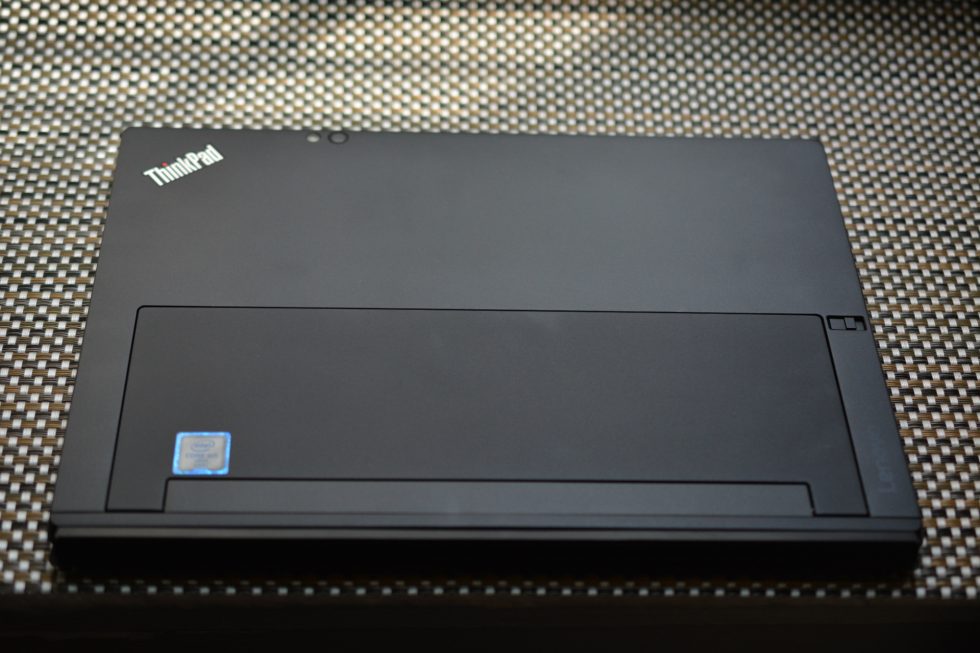
The X1 takes the convenience of a tablet, incorporates a metal kickstand, and attaches a solid keyboard to the bottom so it can become a laptop at any time. So as not to overwhelm consumers with a ton of unnecessary features, Lenovo build three custom “modules” for the X1 which can turn it into a projector, a 3D scanner, and a longer-lasting, port-happy work device. Without any modules, the X1 starts off at a hefty $1,029. I recently lived with the mid-tier module ($1,349) for awhile and, although it’s a powerful and capable device, I’m not sure I’d want it to replace my regular laptop.

Check this Topic at arstechnica.com

Image courtesy of arstechnica.com

Filed Under: ThinkPad

Lenovo ThinkPad X1 Carbon (4th Gen) Review

May 13, 2016 by Ian Orford Leave a Comment

To say that we are ThinkPad fans at Laptoptopics would be a bit of an understatement so it comes as no suprise to say that we were wowed by the 4Th generation X1 carbon. ZDNET seems to agree with us an lavishes praise and an ‘Outstanding close to 5 Star rating on Lenovos flagship

Lenovo has delivered another impressive ThinkPad X1 Carbon, albeit one that’s distinctly evolutionary. Connectivity is improved, but the touchscreen option is gone and battery life could be better.

Lenovo has never stinted on the ThinkPad X1 Carbon, its flagship thin-and-light business laptop. This year the company has expanded the X1 range, which now includes the modular ThinkPad X1 Tablet and the convertible ThinkPad X1 Yoga with OLED display. The ThinkPad Carbon X1 has also had an upgrade, the fourth-generation version being “the world’s lightest 14-inch business ultrabook,” according to its maker.

ThinkPad laptops have a certain ‘design icon’ status about them. The matt-black chassis, silver ‘ThinkPad’ on the lid with the red-LED ‘i’ dot that pulses when the notebook is sleeping are simple, useful and distinctive visual elements.

At 1.64cm and 1.21kg, the 2016 ThinkPad X1 Carbon is even thinner and lighter than the 2015 version (1.77cm and 1.31kg). It’s powered by Intel’s latest Core i5 and i7 processors.

Check this Topic at zdnet.com

Image courtesy of zdnet.com

Filed Under: ThinkPad Tagged With: thinkpad x1 carbon 4th gen review

Lenovo Yoga 900 review

May 13, 2016 by Ian Orford Leave a Comment


Respected site Techradar says that the Lenovo Yoga 900 is maturing into an excellent convertible Ultrabook. The Yoga is a superb example of what Lenovo is capable of achieving and more importantly because it owns and in fact is the supply chain, is much more capable of refining a popular model when it hits on one. The Yoga 900 is mouthwateringly beautiful to look at and we love the concept here at LaptopTopcs

After launching the Yoga 3 Pro last year, Lenovo found a winning design formula, and it isn’t deviating much with this year’s refresh.. The Yoga 900 has a different numbering convention, but the convertible Ultrabook is an iterative successor to the Yoga 3 Pro, promising longer battery life, faster performance and improvements to a winning 360-degree swiveling hinge design. All three devices utilize a convertible design, but instead of detachable displays like on the Surface line, Lenovo opted for a rotating hinge with the Yoga 900.

The Lenovo Yoga 900 is what last year’s Yoga 3 Pro should have been: a powerful laptop in a slim package.

Check this Topic at techradar.com

Image courtesy of techradar.com

Filed Under: Yoga Tagged With: lenovo yoga 900 review

  • « Previous Page
  • 1
  • …
  • 4
  • 5
  • 6

Search Topics

Connect With Us Online

  • Facebook
  • Instagram
  • Pinterest
  • YouTube

Features

  • Switch From MacBook To Windows – And Why You Should – Roundup March 18, 2017
  • Try And Break This! Dell Latitude Rugged Laptop March 15, 2017
  • Laptop Tech Support: 2017 Reviews – Apple Hits The Spot Again March 13, 2017
  • Apple Is Dead To Me… And why NOT to buy a MacBook March 13, 2017
  • Dell Inspiron 15 7000 Gaming (7567) Review – Best Budget Gamer? March 10, 2017

Topic Categories

  • Acer
  • Alienware
  • Apple
  • Asus
  • Dell
  • EliteBook
  • Envy
  • Hard Drives
  • HP
  • IdeaPad
  • Inspiron
  • iPhone 7
  • Laptop Graphics
  • Laptop Processor
  • Latitude
  • Lenovo
  • MacBook
  • MacBook Pro
  • MSI
  • Omen
  • Operating Systems
  • Pavilion
  • Samsung
  • Surface
  • Surface Book
  • Tech Topics
  • ThinkPad
  • Toshiba
  • XPS
  • Yoga

Tech Topics

It's showdown time again with their yearly tech support showdown Laptop Mag … [Read Topic...]

Laptop Topics

  • About
  • Contact Us

Our Partners

laptop topics laptop topics laptop topics

Copyright © 2026 · News Pro Theme on Genesis Framework · WordPress · Log in